Resellers System
The panel includes a resellers system that lets you create and manage sub-reseller stores with automatic markup pricing. This hierarchical system allows you to distribute your products through partner stores while maintaining control and visibility over pricing, balance, and cheat management.
Hierarchical Structure
The resellers system operates on a two-level hierarchy: your main store (reseller) and sub-reseller stores. Sub-resellers cannot create their own sub-resellers, maintaining a simple and manageable structure. Each reseller store operates independently with its own balance, keys, and settings, while you maintain full control as the parent reseller.
Reseller Management
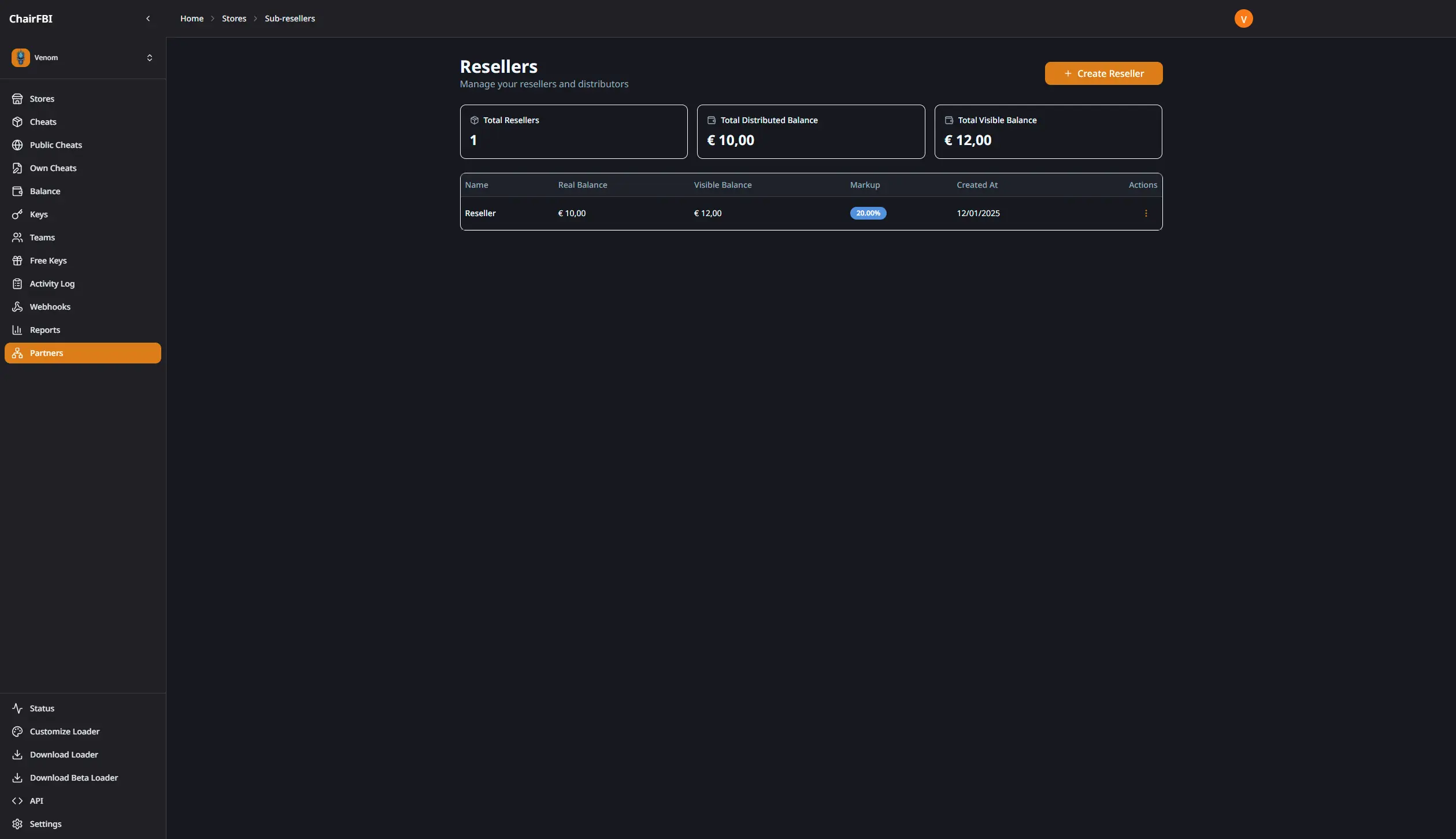
The resellers page provides a centralized view of all your sub-reseller stores with key statistics:
- Total resellers: count of all active reseller stores
- Real balance total: sum of actual balance across all resellers (before markup)
- Visible balance total: sum of visible balance with markup applied
The main table displays each reseller with:
- Store name
- Real balance (actual balance without markup)
- Visible balance (balance shown to reseller with markup applied)
- Markup percentage configured
- Creation date
You can create new resellers, edit existing ones, add or remove balance, and access each reseller store directly from this page.
Automatic Markup System
The resellers system includes an automatic markup feature that applies a percentage-based price increase to all transactions. When you configure a markup percentage for a reseller (0-100%), the system automatically:
- Applies markup to key prices when resellers purchase keys
- Shows markup-adjusted balance in the reseller’s view
- Calculates markup on balance transfers
- Displays markup-adjusted values in activity logs (for parent reseller view)
The markup is transparent to the reseller user—they see the final prices with markup already applied, while you see both the real values and markup information in your activity logs.
Parent Reseller Access
When you access a reseller store (via the store selector in the sidebar), you have full control as if it were your own store:
- Full navigation: reseller stores appear in your sidebar alongside regular stores
- Complete access: create and edit cheats, manage settings, access API tokens, customize loaders
- Balance management: add or remove balance, view transaction history
- Activity monitoring: see all actions with markup information visible
- Store configuration: modify store settings, API access, and customization options
Reseller stores integrate seamlessly into your workflow, appearing in your dashboard, store selector, and all management pages.
Available Features for Parent Reseller
When you access a reseller store, you have access to all standard features:
- Cheat Management: create, edit, and manage cheats (these become “derived cheats” visible to the reseller)
- Key Management: view and manage all keys created by the reseller
- Store Settings: configure store name, logo, colors, API tokens, loader tokens
- Customization: access loader customization options
- API Access: view and manage API tokens for integration
- Activity Logs: monitor all actions with markup information displayed
- Webhooks: configure webhook integrations
- Balance Operations: add or remove balance, view transaction history
Restricted Features for Reseller Users
Reseller users (those who log in with reseller credentials) have limited access to maintain security and control:
- Balance: cannot add balance directly (must receive transfers from parent)
- Teams: team management is not available
- Free Keys: free keys system is not accessible
- Store Settings: settings page is blocked (only parent can configure)
- API Access: API access is currently restricted (may be enabled in future updates)
Reseller users can:
- View and manage cheats assigned by the parent (derived cheats)
- Create and manage keys (with markup applied automatically)
- Access activity logs (without markup information visible)
- Configure webhooks
- Download loader files
Balance Management
Balance transfers to resellers work with automatic markup calculation:
- Adding Balance: when you transfer balance to a reseller, the system calculates the visible balance with markup applied
- Removing Balance: you can remove balance from resellers, with the system handling the markup calculation
- Real vs Visible: the system maintains both real balance (actual value) and visible balance (with markup) for accurate accounting
- Activity Logs: balance transfers show markup information in activity logs when viewed by the parent reseller
The markup ensures that resellers see prices and balances that reflect your configured markup percentage, while you maintain visibility into the actual values.
Derived Cheats
When you create or edit cheats while accessing a reseller store, these cheats become “derived cheats” that are automatically available to the reseller:
- Automatic Availability: cheats you create in a reseller store appear in the reseller’s “Cheats” tab
- Single Tab View: reseller users only see the “Cheats” tab (Own Cheats and Public Cheats tabs are hidden)
- Full Functionality: resellers can create keys from derived cheats with markup automatically applied
- Parent Control: you maintain full control over which cheats are available to each reseller
This system allows you to curate the product catalog for each reseller while they operate independently with their own keys and customers.
Activity Logs and Markup Visibility
The activity log system provides different views based on who is viewing:
-
Owner Reseller View: activity logs show markup information including:
- Markup percentage used at the time of the transaction
- Visible values (with markup applied)
- Real values (without markup) for internal reference
- This applies to key creation, key deletion, and balance transfers
-
Sub-Reseller View: activity logs show standard information without markup details:
- Final prices and amounts (already include markup)
- No markup percentage or real value information
- Clean, simplified view for reseller users
This dual-view system ensures transparency for you while keeping pricing details private from reseller users.
Use Cases
Distribution Networks: create multiple reseller stores to distribute your products through different channels or regions.
Partner Management: manage partner stores with custom markup rates based on partnership agreements.
Market Segmentation: offer different pricing tiers to different reseller groups.
Brand Separation: operate separate reseller stores for different brands or product lines.
Testing and Development: use reseller stores to test new features or configurations without affecting your main store.