Panel Customization
⚠️ Important: Panel customization is only applied when accessing the panel through a custom subdomain. When accessing through the main domain, default ChairFBI branding is displayed.
The panel customization system allows you to white-label the reseller panel with your own branding, colors, logos, and custom domain. This feature is exclusive to resellers and applies to all sub-reseller stores under your store.
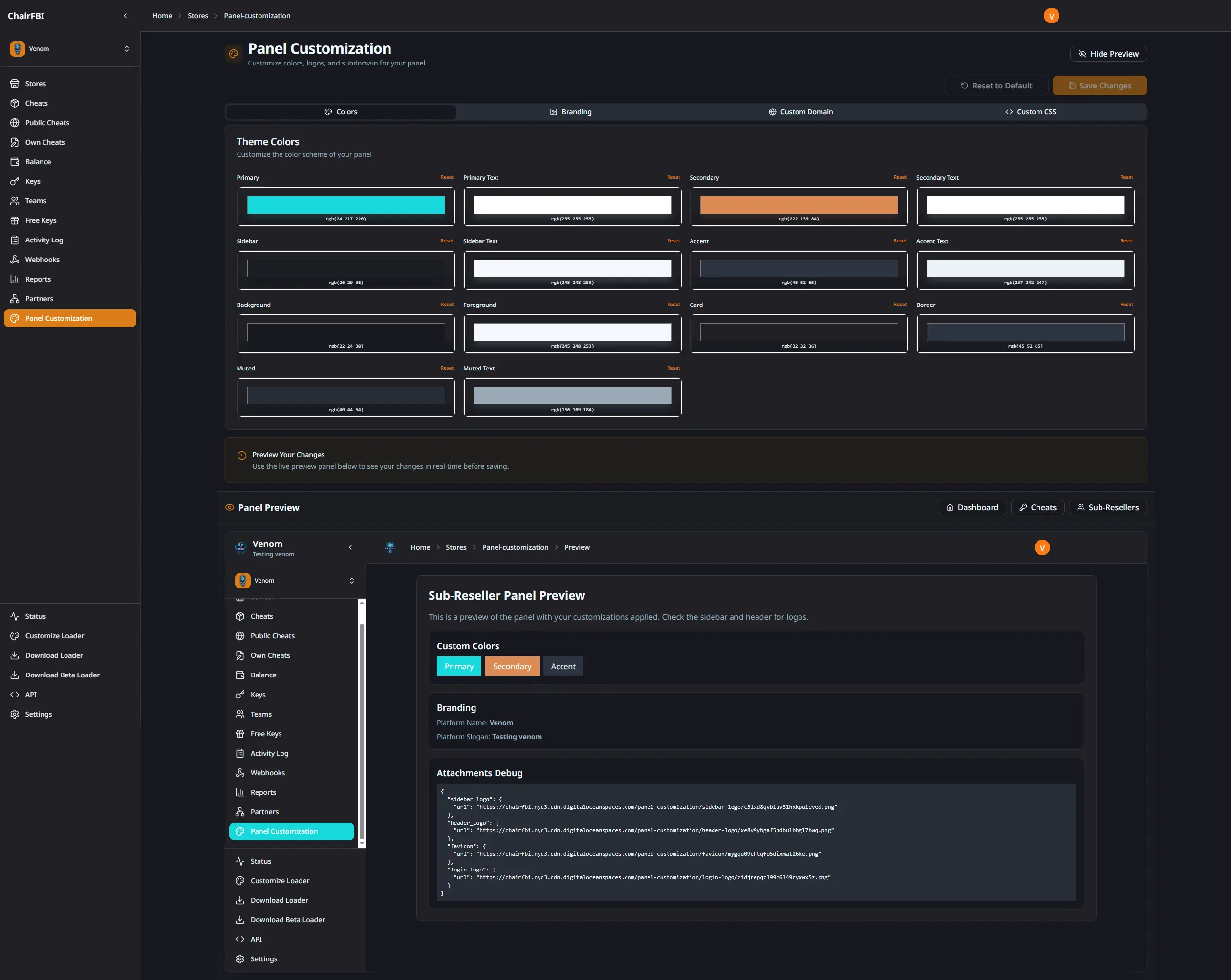
Customization Options
Theme Colors: customize the primary color scheme of the panel including:
- Primary color (buttons, links, accents)
- Secondary color (secondary elements)
- Accent color (highlights, badges)
- Background color (main panel background)
Branding Assets: upload custom logos for different areas:
- Sidebar Logo: displayed in the sidebar navigation
- Header Logo: shown in the top navigation bar
- Login Logo: appears on login pages
- Favicon: browser tab icon
Platform Information:
- Platform Name: replaces “ChairFBI” throughout the interface
- Platform Slogan: subtitle displayed in sidebar and login pages
Custom Domain: configure a custom domain for your reseller panel:
- Point your domain to the provided address
- Configure DNS records (A or CNAME)
- Domain must be verified before customizations are applied
Custom CSS: add custom CSS rules to further personalize the panel:
- Override default styles
- Add custom animations
- Adjust spacing and layouts
Live Preview
The customization page includes a live preview that shows how your changes will look:
- Real-time updates as you modify settings
- Full dashboard preview with working navigation
- Side-by-side comparison with editor
- Test different pages (cheats, sub-resellers, settings)
How It Works
- Access Panel Customization: navigate to the “Panel Customization” option in your sidebar
- Make Changes: use the tabs to configure colors, upload logos, set platform name, configure domain, or add custom CSS
- Preview Changes: the preview panel updates in real-time showing how your panel will look
- Save Changes: click “Save Changes” to apply customizations to all your sub-reseller stores
- Reset if Needed: use the “Reset to Default” button to return to the original theme
Customization Scope
Subdomain Requirement: customizations are only active when accessing the panel through your configured custom subdomain. This ensures that:
- Your main panel (accessed via main domain) shows default ChairFBI branding
- Your custom branding appears when users access via your custom subdomain
- All sub-reseller stores automatically inherit your customizations when accessed via the custom subdomain
When Customizations Apply:
- Custom Domain Access: when accessing through your custom domain, all users see your custom branding
- Sub-Reseller View: all sub-reseller stores automatically display your custom branding (when accessed via custom subdomain)
- Parent Reseller View: your main panel shows default ChairFBI branding when accessed through the main domain
- Automatic Application: customizations apply to all pages including login, dashboard, customer panel, and all management pages (when accessed via custom subdomain)
When Customizations Do Not Apply:
- Accessing the panel through the main ChairFBI domain shows default branding
- This separation allows you to maintain your own branded experience while keeping the main domain with default branding
Security and Isolation
- CSS Sanitization: custom CSS is sanitized to prevent malicious code injection
- File Validation: uploaded images are validated for type, size, and format
- Secure Storage: logos and assets are stored securely and served through CDN
- Domain Verification: custom domains require DNS verification before activation
Use Cases
White Label Solution: completely rebrand the panel to match your company identity when accessed through your custom subdomain.
Partner Branding: apply partner logos and colors for co-branded experiences.
Regional Customization: use localized branding for different markets.
Professional Appearance: present a polished, branded interface to your sub-resellers and their customers through your custom subdomain.
Custom Domain: operate under your own domain for brand consistency and trust, with all customizations automatically applied.